

GNOME Shell Extension · Version 50.0.1

Your music, one click away.

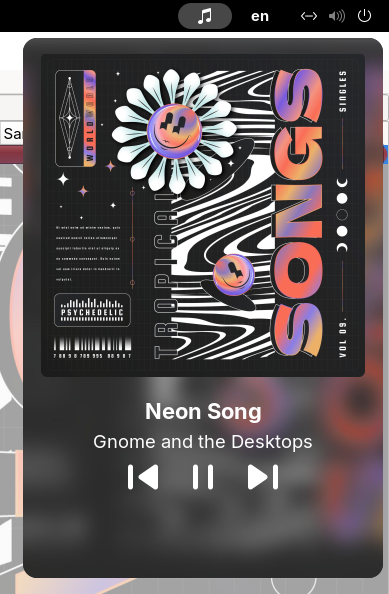
Dropbeat feels at home in the GNOME shell while also looking sleek and modern. A fullscreen pop-up featuring the playing track and album art is also one click away.

Requires ImageMagick · Works with Firefox, Spotify, VLC, and other MPRIS players

Dropbeat open from the GNOME top bar, showing Neon Song by Gnome and the Desktops with album art and playback controls
Dropbeat in the top barAlbum artwork by Magnific (opens in a new tab)
1,400+downloads on GNOME Extensions
GNOME 50supported GNOME Shell version
MPRISworks across compatible Linux media players
GPL-3.0free and open-source software

Why use Dropbeat?

01

Art first

Shows the album art on a blurred background, inspired by Apple CarPlay and Android Auto.

02

Go fullscreen

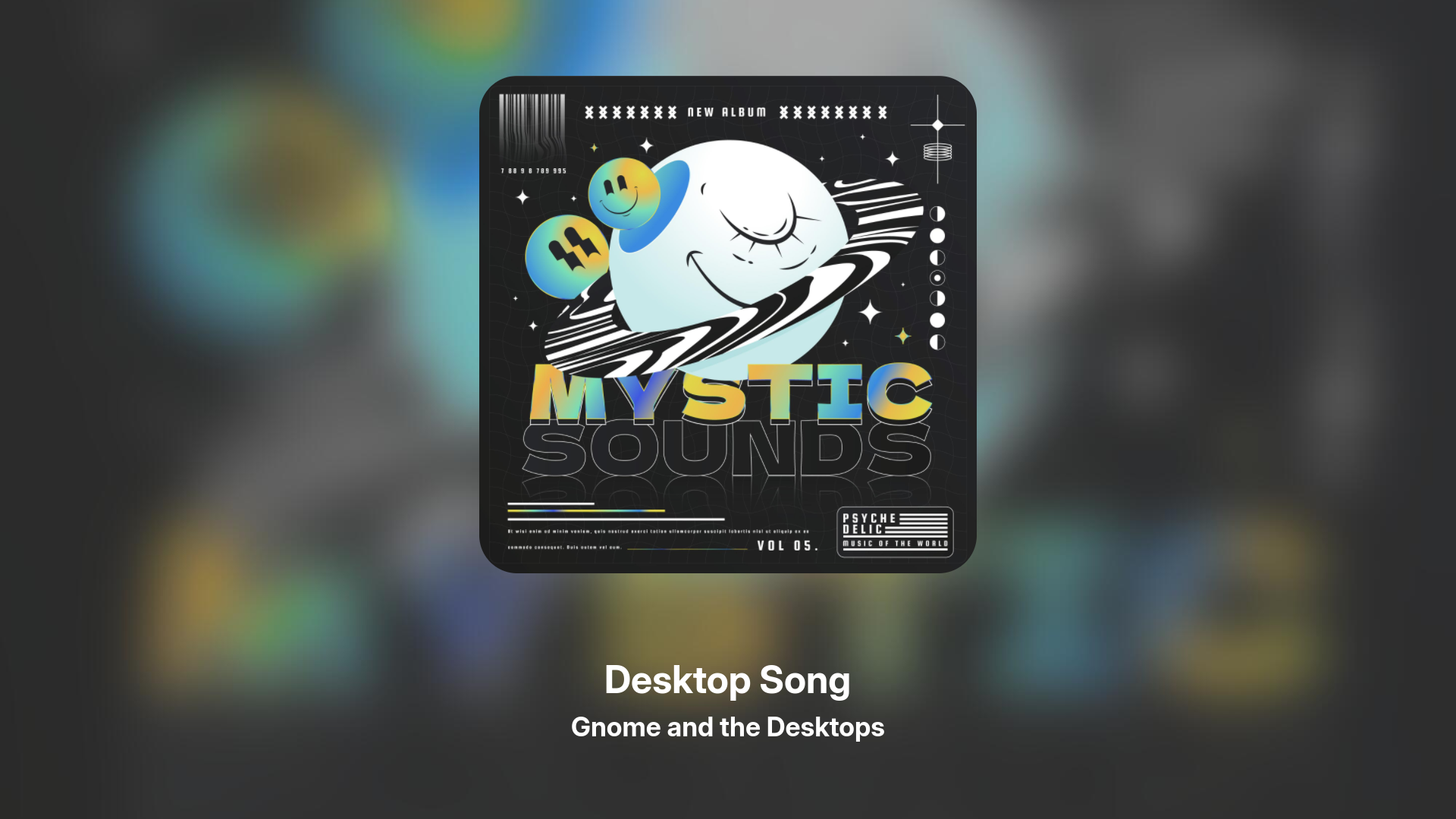
Click the album art to show a fullscreen splash.

03

Not tied to one music app

Dropbeat works with MPRIS, so it should work with any Linux media player.

Put the art on full display.

Dropbeat builds the background from the current artwork, keeps the cover square in the center, and updates the view when the track changes.

Dropbeat’s fullscreen now-playing view showing Desktop Song by Gnome and the Desktops over a blurred color-matched background
Fullscreen viewAlbum artwork by Magnific (opens in a new tab)

Supported versions

Dropbeat supports these GNOME Shell versions:

GNOME48GNOME49GNOME50

GNOME Extensions selects the compatible build for your Shell version.

Without Words

Translation contributions are welcome, however the only language in the extension is in the settings menu. Currently only English is officially supported.

Offer a translation (opens in a new tab)

Notices

Dropbeat is intentionally small and puts most image processing work into a common utility called ImageMagick for stability and simplicity.

Required

ImageMagick

I use ImageMagick to crop awkward cover sizes and create the blurred fullscreen background. First run explains how to install it on common distributions if you don't already have it.

Standard

MPRIS

Your player needs to expose the standard Linux media-player interface. If GNOME already picks it up in the notifications menu, this extension will too.

Current behavior

One player at a time

Dropbeat follows the active player rather than showing a switcher. If that player closes, it can move to another available player.

Does Dropbeat make network requests?

I do not collect telemetry. Dropbeat only makes a request when a player supplies an HTTP or HTTPS cover URL and remote cover fetching is enabled. You can turn that off in Preferences; local artwork and processing stay on your machine.

Which controls are not included yet?

Dropbeat does not currently include shuffle, repeat, volume, seeking, or a progress bar. It is centered on artwork, track information, and previous, play/pause, and next.

What happens if several players are open?

Dropbeat shows one active player. It does not have a manual player picker yet, but it will move to another available player when the current one closes.

Open-Source

Dropbeat is a TypeScript app that uses Clutter and GTK. The card uses MPRIS and D-Bus to connect it to the player, and the fullscreen display starts a GTK4 window as a separate GJS process.

TypeScript + GJSTyped source compiled for GNOME’s JavaScript runtime.
St + ClutterNative GNOME Shell widgets for the top-bar card.
MPRIS + D-BusPlayer discovery, track metadata, and playback controls.
GTK4A separate fullscreen now-playing window.
GSettings + gettextPersistent preferences and translation-ready text.
ImageMagickSquare cover crops and blurred artwork backgrounds.

Release notes

I write these when an update changes something worth explaining.

Use it with the player you already have.

Install Dropbeat from GNOME Extensions, or look through the source before adding it to your desktop.